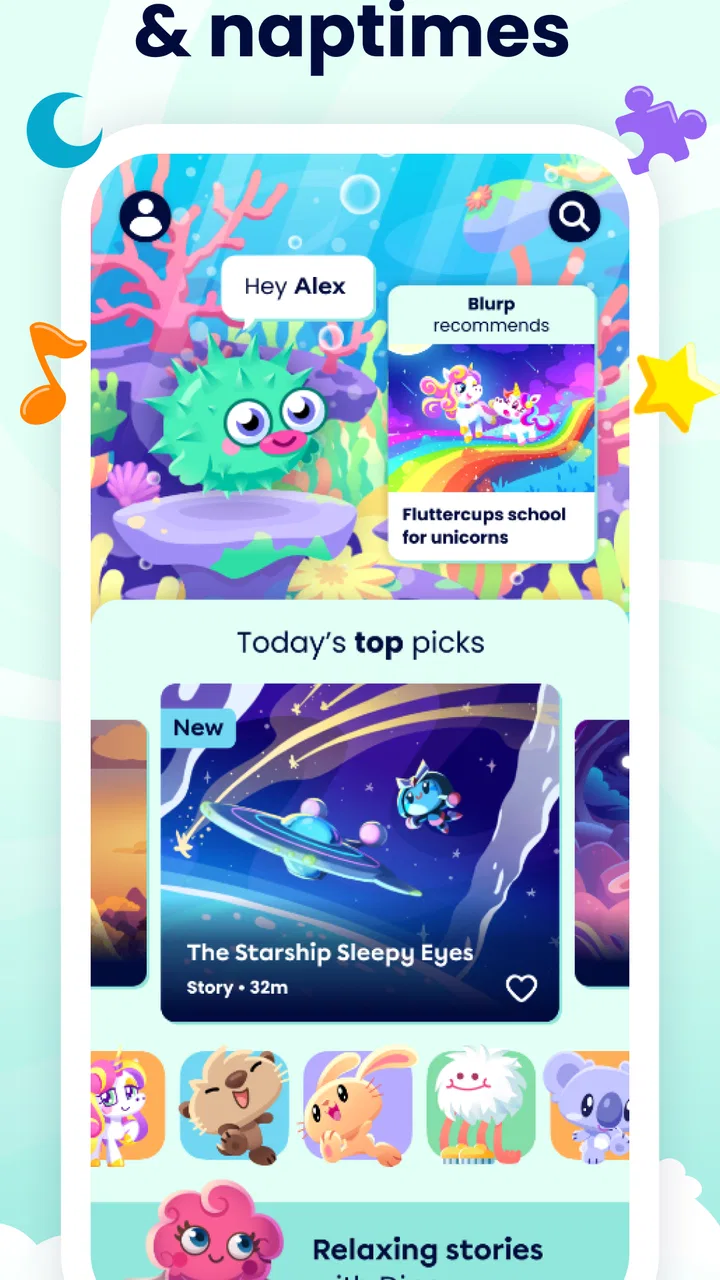
Moshi Kids: Sleep, Relax, Play
- 4.6
- Rating
- 1.00M
- Installs
- Free
- Price

 Analysis by App-foxy
I tested Moshi Kids: Sleep, Relax, Play as the kind of app that lives on a family tablet rather than on one person’s phone. That distinction matters. Its mix of stories, sounds, music, and games is aimed at children, but the practical question for a household is whether it can fit calmly into shared routines without becoming another source of arguments, noise, or unclear expectations. My overall impression is positive: it is a gentle education app from Mind Candy Ltd that works best when an adult chooses how and when it is used.
The app is free to download and is rated for Everyone, which makes it approachable for families with younger children. It has built a sizeable audience, with more than a million installs and an average rating of 4.6 from roughly seven thousand ratings. Those figures do not replace personal judgment, but they do suggest that the concept has connected with many households. I found the strongest use case was not endless entertainment. It was giving a child a softer transition between active parts of the day and quieter moments such as reading, resting, or getting ready for sleep.
How Moshi Kids fits into a shared family routine
I’d use a shared-device routine to make Moshi Kids feel predictable rather than like a screen-time free-for-all. Before opening it, I’d agree on who chooses and what marks the end of the session; that simple plan can head off friction when siblings have different tastes. The next section looks at how adults can keep those expectations consistent across caregivers and everyday situations.
You May Also Like

 Blood Strike: 2.5 Anniversary
Blood Strike’s Loadouts Turn Every Drop Into a Tactical Gamble
A close look at Blood Strike’s custom loadouts: how fast access to signature weapons reshapes its battle royale rhythm, rewards preparation, and narrows the gap between fights.

 Pandora - Music & Podcasts
Pandora’s Music Is Easy to Start, but Harder to Recover
Pandora’s strength is its low-effort path from a seed to a station. Its weak spot is how much confidence it asks you to place in connection, setup, and quiet recovery.

 8 Ball Pool
 Is Built on Rivalries, Rematches, and Routine
A close look at the rivalries, rematches, shared routines, and unanswered safety questions that turn a quick pool match into a persistent mobile community.

 Samsung Music
’s Quiet Strength Is Playing What You Already Own
Its reach comes less from spectacle than from dependable access to a personal library. That simplicity is both the app’s strongest retention engine and its ceiling.

 AccuWeather: Weather Radar
AccuWeather Review: A Quick, Clear Forecast for Everyday Decisions
For everyday plans, the best forecast is the one you can understand quickly. AccuWeather makes rain timing, radar, and local conditions easy to act on, with a few trade-offs.

 Hill Climb Racing
Why Hill Climb Racing Still Turns Crashes Into One More Run
A tiny car, a bumpy hill and one more upgrade: Hill Climb Racing keeps resurfacing because its simple chaos makes every near-miss feel personal.
More From Our News Desk



A useful shared-device scenario
Imagine a tablet kept in the living room or a child’s bedroom. One child wants a bedtime story, another wants music, and an adult needs the device back soon. In that situation, Moshi Kids can act as a small menu of calming activities rather than a single-purpose game. I would let the child choose between a story, a soundscape, or a simple game, but I would set the stopping point before handing over the tablet. That small conversation prevents the app from becoming an open-ended negotiation later.
For a busy evening, I would use it after bath time or after putting away toys, not as a reward that must continue until the child falls asleep. The distinction is important: the app can support a routine, but it should not be treated as the routine itself. A child may become focused on choosing the next item, especially when several types of content are available. In my experience, the best results came when the adult made the first selection and allowed limited choice afterward.
It is also practical for quiet waiting. A child sitting beside a parent during a long appointment or a calm afternoon at home may enjoy a short story or game without needing a full television program. The content variety helps here because the adult can choose something less stimulating than a fast video. Still, I would keep the sound low and use headphones only when they are comfortable and appropriate for the child. The app is not a substitute for awareness of the surrounding environment.
What happens when several children use it
Shared use exposes a limitation that is easy to miss when testing alone: the app is not automatically a neutral family space. Different children may have different preferences, attention spans, and bedtime rules. One may want music while another expects a story. If the device is passed around without a plan, the choice itself can take longer than the activity.
My workaround is simple. I would agree on an order before opening the app: one child chooses the first activity, the other chooses the next, and then the tablet is put away. For younger children, an adult can select both items in advance. This is not a special feature of Moshi Kids; it is a household habit that makes the app work better. The app supplies the content, while the family supplies the boundaries.
That also means I would not describe it as a perfect shared profile experience. I would treat it more like a common bookshelf or music player. The child using it at that moment gets the immediate experience, but the adult remains responsible for deciding whether the selected material suits the time, the child, and the setting.
Setting boundaries before installation becomes use
The app runs on Android from version 8.0 onward, so the first practical check is whether the family device meets that requirement. Its current version is 10.12.0, and keeping the app current is sensible for compatibility. I would install it on the device where the child will actually use it, then explore the available areas myself before presenting it as part of the daily routine.
Because the download is free but includes in-app purchases ranging from $0.99 to $239.99 per item, I would handle the account and purchase settings before giving a child independent access. That price range is significant enough that I would not leave purchase decisions to chance. The safest workflow is to make the adult responsible for any store confirmation and to explain to the child that tapping an item does not automatically mean it can be bought.
This is one of the most important household details. A free starting point can feel harmless, yet optional purchases change the way a shared device should be managed. I would not hand over a logged-in device without first checking who can approve transactions. I would also avoid presenting paid content as something the child can unlock whenever they want, because that turns a relaxing app into a recurring bargaining point.
Another useful boundary is physical rather than technical. I would decide where the tablet stays, when it can be used, and whether it returns to that place after the session. Moshi Kids is easier to manage when it has a clear role, such as a short wind-down activity, rather than becoming the default answer whenever a child is bored. This approach also makes it easier to notice whether the child is genuinely relaxing or simply asking for more screen time.
Coordinating adults, siblings, and daily expectations
In a household, consistency matters more than having the perfect content choice. If one adult allows unlimited switching while another allows only one story, the child learns to negotiate with the adults instead of engaging with the app. I would agree on a basic family rule: who starts the activity, how choices are made, and when the device goes away.
For co-parents or other caregivers, a short verbal agreement is enough. For example, one adult can handle setup and purchases, while another handles the bedtime selection. The point is not to create a complicated management system. It is to prevent avoidable confusion around a shared device. Since I would not rely on the app alone to communicate family rules, I would make the household expectation clear outside the screen as well.
With siblings, alternating choices sounds fair but does not always feel fair to a younger child. A better arrangement may be to let one child choose the type of activity and the other choose the specific item, then reverse those roles the next day. This makes the variety of Moshi Kids useful without turning every session into a contest. It also gives adults a way to steer the mood without making the child feel that every decision has been taken away.
For travel, I would decide in advance whether the app is being used as a quiet break or as a main activity. Stories and music can be easier to fit into a journey than a large physical toy, but the device still needs charging, volume awareness, and supervision appropriate to the child. I would download or prepare anything needed before leaving rather than assuming the same conditions will be available everywhere. That is basic travel planning, but it prevents a calm idea from becoming a stressful one.
Age context and the question of trust
The Everyone rating makes the app broadly suitable from a store-age perspective, but that does not mean every part will suit every child equally. A preschool child, an early reader, and an older child can respond very differently to the same story or game. I would judge suitability by the individual child’s reactions: can they stop when asked, choose calmly, and move on to another activity without becoming upset?
For a child who is sensitive to sound or easily overstimulated, I would introduce the quieter material first. Music and sound-based content may be soothing for one child and distracting for another. The same applies to games. A child who becomes frustrated by choices or wants to repeat an activity may need a shorter session, an adult-selected item, or a different part of the app altogether.
Trust also includes knowing what the child can do without help. I would be comfortable letting an older, responsible child choose among content types after an adult has checked the purchase boundary. I would be more cautious with a younger child, especially on a shared device that contains other accounts or store access. The app’s child-friendly positioning does not remove the need for ordinary digital supervision.
Parents often ask whether an app like this can replace a parent reading a bedtime story. In my view, it should not be framed that way. A recorded story or calming sound can be useful when an adult is occupied, when a child wants a familiar independent activity, or when a household needs a quiet bridge toward sleep. But it does not provide the same conversation, reassurance, or personal connection as reading together. I see Moshi Kids as a companion to family routines, not a substitute for them.
Where it differs from ordinary alternatives
The usual alternatives are a video service, a music app, a podcast, a physical storybook, or a general children’s game. Moshi Kids sits between these options. Compared with a general video service, its focus on stories, sounds, music, and games can make it easier to choose something calmer without navigating a huge adult-oriented catalog. Compared with a single storybook, it offers more variety and can suit different moments of the day.
Its trade-off is that variety can create indecision. A physical book has a natural stopping point, while a digital collection encourages another selection. A general music app may offer more control for adults who already have carefully organized playlists, while Moshi Kids is more directly shaped around children’s use. A standalone game may be better for a child looking for challenge and progression, but that is not where this app feels strongest to me.
I would choose it over a fast video when my priority is a calmer shared-device experience. I would choose a book over it when I have the time and the child wants interaction. I would choose a more specialized learning tool when the goal is structured practice in reading, mathematics, language, or another school subject. Moshi Kids belongs in the space between education and relaxation: it can encourage listening and imagination, but I would not use it as a formal lesson platform.
Small details that improve the experience
My first practical tip is to explore the app without the child present. That lets an adult identify a suitable starting point and avoid spending the first session scrolling through every option. It also makes it easier to match the content to the moment: quiet material before bed, something more playful during a daytime break, and a shorter choice when the family is already running late.
My second tip is to use a spoken stopping cue rather than announcing “one more” repeatedly. I would say, “This is the last story, then the tablet returns to its place,” before starting. The child then knows the boundary before becoming absorbed. This is especially useful with siblings, because the rule applies to the shared device rather than appearing to target one child.
My third tip is to watch the transition after use. If the child closes the app peacefully and moves on, the chosen activity probably fits the routine. If the child becomes more alert, asks to switch constantly, or argues intensely about continuing, I would shorten the session or choose a less stimulating option. The right content is not just what the child enjoys most; it is what leaves the household in a better state afterward.
A fourth insight concerns independence. I would gradually give a child more choice instead of handing over complete control immediately. Start with two adult-approved options, then allow the child to choose the content within that boundary. This makes the app a place to practice decision-making without turning the device into an unrestricted playground.
Limitations worth considering before relying on it
The biggest limitation is that the app cannot solve household coordination by itself. It does not remove the need to manage screen time, purchases, sibling disagreements, or bedtime expectations. Families hoping for a completely automatic solution may find that the adult still has to do the most important work before and after each session.
The free entry point is appealing, but the range of optional purchase prices means the financial side deserves attention. I would not describe the app as entirely cost-free in practical use if a family may want additional content. A parent should decide beforehand whether the free experience is enough or whether purchases are acceptable, then keep that decision separate from a child’s moment-to-moment requests.
It may also be the wrong choice for children who need highly structured academic instruction. Although it belongs to the Education category, I would not expect it to replace a curriculum, a reading program, or a teacher-led activity. Its educational value is more informal: listening, imagination, calm play, and engagement with stories and music. That is worthwhile, but it is a different goal from measurable school practice.
Finally, not every child relaxes through digital content. Some children settle faster with a paper book, a familiar conversation, or no screen at all. If using the app delays sleep or causes repeated conflict, I would trust that observation and choose another routine. A good family app should serve the household; the household should not have to reorganize itself around the app.
My household verdict
I recommend Moshi Kids for families looking for a child-focused mix of stories, sounds, music, and games that can occupy a thoughtful place in a shared-device routine. Mind Candy Ltd has made something more flexible than a single bedtime tool, and that flexibility is its main strength. It can support quiet time, independent listening, a short travel break, or a gentle transition between activities.
I would install it on a family tablet only after deciding who controls purchases, how children take turns, and what the stopping rule is. Those boundaries are not minor details; they determine whether the app feels calming or becomes another source of friction. The Everyone rating and broad content mix make it approachable, but an adult should still match the experience to each child’s age, sensitivity, and ability to stop.
For me, the best way to use it is deliberately: choose a suitable activity, keep the session connected to a real household routine, and put the device away when that routine is complete. If you want formal lessons, unrestricted game depth, or a replacement for shared reading, I would look elsewhere. If you want a friendly digital companion for stories, relaxation, music, and light play, Moshi Kids: Sleep, Relax, Play is a sensible free starting point, provided the family treats it as one tool in the home rather than the home’s entire entertainment plan.
FAQs for Moshi Kids: Sleep, Relax, Play
01What is Moshi Kids: Sleep, Relax, Play?
Moshi Kids is a children’s mindfulness and sleep app designed to help young users relax, settle down, and build calming bedtime routines. It includes narrated sleep stories, soothing music, meditations, breathing exercises, and gentle audio content. The app is aimed primarily at children, although parents can also use it as part of a family relaxation or nighttime routine.
02What kind of content is available in Moshi Kids?
The app offers a broad collection of audio-based content, including bedtime stories, calming soundscapes, lullabies, guided meditations, breathing activities, and short relaxation exercises. Many sessions feature friendly characters and imaginative themes that are easy for children to follow. Content is generally designed for different situations, such as falling asleep, calming down after a busy day, or taking a quiet break.
03Is Moshi Kids suitable for all ages?
Moshi Kids is primarily designed for children, especially preschool and younger school-age users, but the most appropriate content can vary depending on a child’s age, attention span, and individual needs. Parents should preview stories and activities before introducing them. The app is intended as a relaxation aid, not as a replacement for professional medical, psychological, or sleep-related advice.
04Does Moshi Kids require a subscription or an internet connection?
Moshi Kids may provide some introductory or limited content for free, while full access to its library is generally offered through a paid subscription or in-app purchase. Availability, pricing, trial periods, and included features can differ by platform and region. Some content may be downloadable for offline listening, which is useful for travel or bedtime routines without reliable internet access.
05Is Moshi Kids safe for children to use?
Moshi Kids is built around child-friendly stories, gentle audio, and relaxation activities rather than social interaction or competitive gameplay. Parents should still review the app’s privacy settings, subscription terms, and parental controls before allowing independent use. It is also wise to use age-appropriate screen-time habits and remember that the app can support a routine, but cannot diagnose or treat sleep, anxiety, or behavioral problems.
Pros
- Calming bedtime stories help children settle into a consistent sleep routine.
- Content is designed for young listeners with gentle voices and soothing soundscapes.
- Offline downloads make selected stories available during travel or without Wi-Fi.
- Simple navigation lets children and parents find relaxing content quickly.
- Includes relaxation activities that can help reduce bedtime anxiety and overstimulation.
Cons
- Many stories and activities require a paid subscription to access.
- Some content may feel repetitive for children who use the app every night.
- The app can encourage screen use close to bedtime despite its sleep-focused purpose.
- Parental controls and settings may feel limited for families with multiple children.
- Downloadable content can take up noticeable storage space on smaller devices.

Moshi Kids: Sleep, Relax, Play
Gallery